Testing Fox Miniheart: A Color Font That Adds Playful Charm to Web Design
Last week I was deep in a homepage redesign for a creative boutique that sells handmade stationery and art prints. The client wanted something that felt warm, personal, and unmistakably handmade. I had already locked in a clean sans serif for body copy, but the hero section needed a voice. That is when I opened Fox Miniheart for the first time and dropped it into the headline. The shift was instant. The entire layout went from polished to personable in one font swap. As a web designer, moments like that remind me why choosing the right display typeface matters more than most people realize.
What Fox Miniheart Brings to a Digital Layout
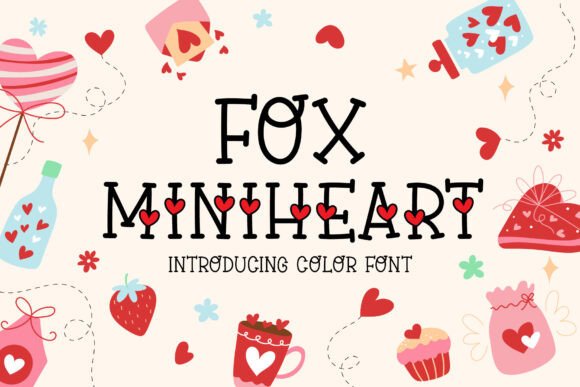
Fox Miniheart is a color font that lives in the space between playful and refined. It carries a handwritten feel without losing structure, which makes it surprisingly versatile for digital use. The letterforms have a gentle roundness, a slight bounce in baseline, and enough personality to stand out in a hero heading without overwhelming the rest of the page. When I first tested it on a mockup for a landing page, the headline read like a warm greeting rather than a generic message. That is the kind of emotional response good typography should create.
Color fonts add another layer. Fox Miniheart includes built-in color information that renders natively in supporting browsers and applications. For a web project, that means you can use the font as a display element without stacking multiple layers or applying CSS tricks to simulate a multicolor effect. It is a single font file doing the heavy lifting. That matters for performance, for consistency across devices, and for keeping your stylesheet clean.
Using Fox Miniheart in a Real Boutique Online Store
For the stationery boutique project, I placed Fox Miniheart in three key areas. The first was the main hero banner. The headline used the font at roughly 48 pixels on desktop, paired with a soft image background. The color embedded in the font picked up the pastel tones from the background photo, creating a cohesive look without extra CSS work. The second use was in product category headers. I scaled it down to 28 pixels for section titles like "Handmade Cards" and "Art Prints." At that size, the font remained readable while still carrying the brand personality. The third application was in the primary call-to-action button. I used a simple sans serif for the button text itself, but I wrapped the button in a decorative border that echoed the font style. That kept the interaction clear while maintaining the visual language established by Fox Miniheart.
The client noticed the difference immediately. They said the site finally felt like their brand. That is the power of a display font that aligns with the brand identity rather than fighting it.
Readability and Responsive Behavior
One of the first things I check with any display font is how it performs on small screens. Fox Miniheart holds up well at moderate sizes, but I recommend keeping it above 24 pixels for digital use. At smaller sizes, the handwritten details and color variation can start to blur, especially on lower-resolution mobile screens. For body text, footnotes, or secondary navigation, pair it with a clean sans serif that handles the readability load. I used Inter for the boutique site, and the contrast between the two fonts created a clear visual hierarchy. The decorative font signaled emotion and brand voice, while the sans serif handled the functional reading tasks.
Another consideration is background contrast. Fox Miniheart works beautifully over light backgrounds and pastel images. When placing it over dark backgrounds, I recommend adding a subtle text shadow or using a lighter weight if available. The font carries enough stroke thickness to stay legible in most dark-on-light scenarios, but testing on actual devices is always the smart move. I previewed the hero section on an iPhone, a tablet, and a laptop before locking in the size and spacing. The extra ten minutes saved me from a last-minute revision.
Font Pairing for a Cohesive Digital Identity
Fox Miniheart is a display font by nature, so pairing it with a neutral body font is the most reliable approach. For the boutique project, I used Inter as the primary sans serif for body copy, navigation, and footer text. The pairing worked because the sans serif stayed out of the way while the display font carried the personality. For a coaching website or a creative portfolio, you could pair Fox Miniheart with a serif font like Lora or Source Serif Pro to create a more editorial feel. The serif would add a layer of warmth and tradition that complements the handwritten charm of Fox Miniheart without competing for attention.
If you are building a digital brand kit, consider using Fox Miniheart for logo text, hero headings, section titles, and decorative accents. Keep it out of long paragraphs, small buttons, and dense navigation menus. That separation preserves the font's impact and prevents readability fatigue for users scanning the page.
Practical Applications Across Digital Touchpoints
Beyond the boutique store, I have tested Fox Miniheart in a few other contexts. For a course sales page, I used it in the headline above the fold and again in the testimonial pull quotes. The handwritten feel made the testimonials read more like personal recommendations than generic endorsements. For a portfolio homepage, I placed it in the project category labels and the main greeting. It gave the page a friendly, approachable tone that matched the creative work on display.
For social media graphics, Fox Miniheart is a natural fit. The color font renders well in static images and can be used in tools like Canva or Photoshop for creating branded posts. If you are building a campaign landing page that needs to feel timely and personal, this font can set the tone before a visitor reads a single word. The visual personality arrives first, and that matters for engagement and brand recall.
Technical Checks Before Going Live
Before I commit to any font in a web project, I run through a short checklist. First, I confirm the file format supports the platforms I need. Fox Miniheart is available in formats that work for both print and digital use, including webfont formats for modern browsers. Second, I check for multilingual support if the project requires special characters or accented letters. Third, I review the commercial license. If the site is for a client or a commercial venture, the licensing must cover web use, embedding, and any distribution of digital assets. Fox Miniheart is a premium font, so using it within the appropriate license terms protects both the designer and the client.
I also check whether the font includes alternates or stylistic sets. Some color fonts offer multiple versions of certain letters, which can be useful for logo work or custom headlines. Even if you do not use alternates in the first version of the site, knowing they exist gives you flexibility for future updates.
Building a Polished Brand Experience with Fox Miniheart
Typography is one of the fastest ways to shift how a website feels. A font like Fox Miniheart does not just decorate a page. It signals warmth, creativity, and attention to detail. For a boutique online store, a coaching site, or a creative portfolio, that signal can be the difference between a visitor bouncing and a visitor staying to explore. When I use Fox Miniheart in a project, I always pair it with intentional spacing, clear hierarchy, and a restrained color palette. The font is already doing a lot of expressive work, so the rest of the layout should support rather than compete.
If you are designing a digital brand kit or a campaign landing page and want a typeface that feels like it has a personality, Fox Miniheart is worth testing. Drop it into a headline, adjust the size until it feels natural, and see how the rest of the page responds. Sometimes the right font is all a layout needs to go from good to genuinely memorable.