Maggie Chevylia: A Classy Serif Font for Modern Web Design
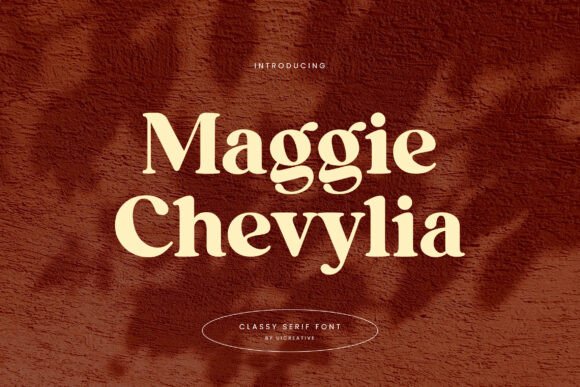
When I started designing the landing page for a high-end coaching brand, I knew the header needed to make an immediate impact. It had to feel established, trustworthy, and visually refined. I tested several typefaces, but nothing clicked until I dropped Maggie Chevylia into the hero section. This modern display serif font immediately brought a sense of class and elegance to the digital canvas. Its clean, stylish lines felt like a natural foundation for a boutique online brand identity.
Maggie Chevylia is a classy serif font that walks the line between modern minimalism and editorial sophistication. The letterforms are beautifully crafted, with a high-contrast stroke that gives it a premium, fashion-forward feel. In a web context, this translates to headers that look like they belong on a luxury product page or a design portfolio. It doesn’t just sit there; it commands attention without being aggressive. For a web designer, finding a font that balances unique character with broad digital utility is a rare win, and Maggie Chevylia delivers exactly that.
Elevating Brand Headers and Hero Sections
Maggie Chevylia truly shines in header and hero section applications. I used it for the main headline on a boutique store’s homepage, and it instantly elevated the perceived value of the products. The font’s elegant serifs created a strong visual hierarchy, guiding the user’s eye naturally from the headline to the call-to-action button. It is a fantastic choice for online store banners, SaaS landing pages, and creative agency websites where first impressions are everything.
In a realistic testing scenario, I placed Maggie Chevylia over a full-width lifestyle image with a dark gradient overlay. The result was stunning. The contrast between the refined serif strokes and the ambient background created a focal point that felt both powerful and sophisticated. It worked beautifully for short, punchy statements like “Elevate Your Space” or “Timeless Design.” For a web designer, this type of immediate visual feedback is a strong indicator that a font will perform well in production.
Pairing Maggie Chevylia with a Clean Sans Serif
No web designer works in a typographic vacuum. Maggie Chevylia needs a partner, and I found it paired exceptionally well with a clean, neutral sans-serif for body copy. Fonts like Montserrat, Lato, or Open Sans provide the perfect contrast. The decorative serif headers draw the eye, while the simple, readable body text ensures a smooth, user-friendly experience. This pairing works seamlessly for blog posts, about pages, and service descriptions where you want the heading to be memorable but the body text to be effortlessly scannable.
For a digital brand kit, I tested Maggie Chevylia alongside a subtle handwritten script for accent quotes. The combination of the structured serif and the organic script created a dynamic, layered brand identity. This is a powerful technique for landing pages, social media graphics, and email headers where you want to maintain visual interest without overwhelming the user. The key is to let Maggie Chevylia take the lead in the header and support it with simpler, more functional typefaces for the rest of the content.
Readability and Responsive Performance
While Maggie Chevylia is a dream for headlines, it is important to understand its limitations in a responsive web environment. It is a display font, designed for impact. On desktop screens, it looks stunning at 36px and above. On mobile, careful testing is required. I found it works best as a hero title on mobile, scaled down to 24-28px, while using a simpler font for subheadings and navigation.
- Use it for: Hero titles, section headings, logo text, social media banners, and campaign landing pages.
- Avoid it for: Body paragraphs, small navigation menus, form labels, dense dashboard text, or accessibility-critical interfaces where every character must be instantly legible.
I also tested Maggie Chevylia on different background colors and textures. It performs exceptionally well on light backgrounds with a dark text color, providing a crisp, editorial look. On dark backgrounds, it retains its elegance, but ensure the font weight is sufficient to maintain contrast. The font’s high-contrast design means it can sometimes get lost on very busy backgrounds, so using a solid overlay or a subtle drop shadow is a practical workaround for maintaining readability.
Where Maggie Chevylia Fits in a Digital Toolkit
Beyond headers, Maggie Chevylia is a powerhouse for digital branding. I incorporated it into a logo design for a wedding photographer’s website, and it added a layer of elegance to their online presence. The font’s versatility allows it to transition smoothly from a website header to a promotional email banner, maintaining brand consistency across all touchpoints. For a premium font, its ability to scale across different digital assets is impressive.
For web designers working on course landing pages or portfolio sites, Maggie Chevylia can be used to create a strong editorial feel. I used it to title a series of case studies, and the font immediately gave the content a polished, magazine-like quality. It also works well for large pull quotes, adding a decorative element that breaks up text-heavy sections. The key is to use it sparingly and strategically, letting it serve as the anchor of your visual hierarchy.
Technical Considerations and Licensing
Before committing to any font for a client project, I always check the licensing. Maggie Chevylia offers commercial licensing, which is crucial for websites, web templates, and digital brand assets. Make sure to review the webfont licensing details to ensure it covers your specific use case, whether it is for a personal blog, a client’s e-commerce store, or a digital product. The file formats typically include WOFF and WOFF2, which are optimized for the web and ensure fast loading times.
Another practical consideration is checking for included styles, alternates, and ligatures. Maggie Chevylia often comes with a set of stylistic alternates that can be accessed via CSS, allowing you to customize the text for a truly unique look. This is a fantastic feature for web designers who want to avoid the generic feel of standard system fonts. By using the font-feature-settings property, you can enable these alternates and give your typography a bespoke, handcrafted feel that aligns perfectly with a premium brand identity.
For any web designer or digital product creator looking to elevate their projects, Maggie Chevylia is a reliable, beautiful, and practical choice. It brings a sense of class and modern sophistication to any digital canvas, ensuring your brand stands out with elegance and clarity.